Why your Vinted photos show the wrong colour
· 5 min read
Ask any experienced Vinted seller what their returns are actually about and colour comes up immediately. Not damage, not sizing — the item arrived a different shade than the photos showed. It is frustrating precisely because the seller usually did nothing dishonest. The phone did it.
Why do Vinted photos show the wrong colour?
Because the camera corrects the colour before you ever see it. Automatic white balance guesses what colour the light is and neutralises the whole frame, and a single garment filling that frame makes it guess badly. Warm bulbs, one-tap filters and coloured bedding underneath then shift the shade further.
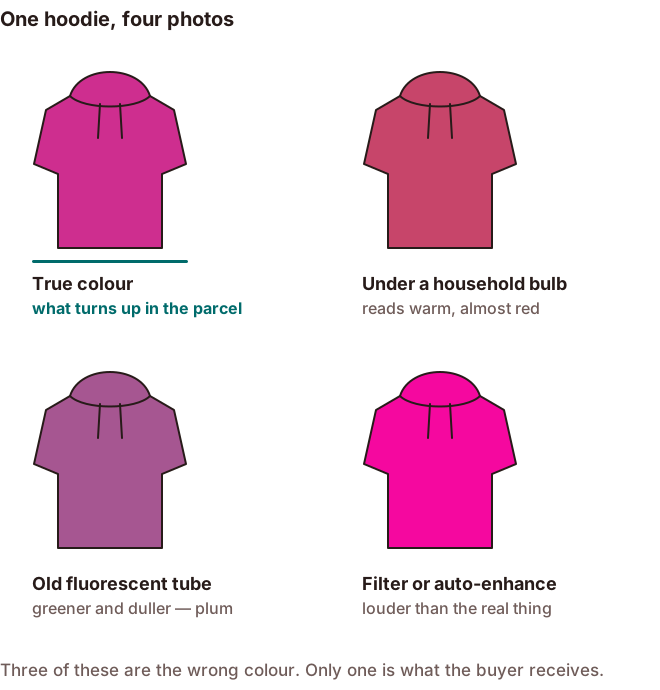
What is your phone actually doing?
Every phone camera runs automatic white balance: it examines the scene, decides what colour the light is, and corrects everything to compensate. Under a warm bulb it cools the whole image down. Against a large block of one colour it over-corrects, because it assumes the scene should average out to neutral.
That last case is exactly what a flat-lay is — one garment filling most of the frame. Photograph a strongly coloured item on a plain background and the camera will often pull the colour toward neutral, which is to say: away from what the item actually looks like.
What shifts the colour most?
| Cause | What it does to the fabric | Fix |
|---|---|---|
| Artificial light | Household bulbs push it warm; older fluorescents push it green | Shoot by a window — daylight is the only neutral light that's free |
| Filters and auto-enhance | Every preset lifts saturation and warmth past the real shade | Turn both off; adjust brightness only |
| Coloured surroundings | A red duvet, or a painted wall a metre away, bounces its colour onto it | Lay it on neutral grey or off-white |
How do you keep the colour honest?
None of the fixes are difficult:
- Shoot in daylight, ideally overcast, near a window.
- Put the item on a neutral grey or off-white surface so there's nothing coloured to bounce.
- Turn off filters and auto-enhance. Adjust brightness only.
- Lock the white balance if your camera app allows it, rather than letting it re-guess per shot.
- Check the result against the actual item, in the same daylight, before you list.
That last step takes five seconds and catches almost everything. Hold the phone next to the garment and look at both. If they don't match, the photo is wrong — reshoot rather than trying to correct it afterwards.
When you genuinely can't match it
Some colours are hard. Deep reds, bright magentas and saturated purples sit outside what phone cameras and phone screens reproduce well, and they'll look slightly off no matter what you do. Iridescent and colour-shifting fabrics are worse.
When you hit one of those, say so in the description: "True colour is closer to photo 3 — the deep red is hard to capture accurately on camera." Naming the limitation is honest, sets the expectation, and is far better than a buyer discovering it themselves.
A stated "colour is hard to photograph" is a warning. An unstated one is a dispute.
Be careful with AI photo tools
Background-removal and photo-enhancement tools have become standard among Vinted sellers, and most of them repaint the item while they work. They are optimising for a picture that looks good, not for a picture that is accurate, and the two are not the same goal. A tool that brightens a dull jumper into a vivid one has just created your next return.
If you use one, test it before you trust it: run an item whose colour you know exactly, and compare the output against the real thing in daylight. Anything that shifts the shade is costing you money downstream, however good the result looks in isolation.
This is the reason ListQuick's Studio Mode changes the background, the lighting and how the item is laid out, but never the item's colour. A magenta hoodie must not come back plum — the buyer is comparing what arrives to what they saw, and that comparison is the only one that counts.
The short version
- Auto white balance guesses, and a full-frame garment makes it guess badly.
- Daylight, neutral surface, no filters.
- Compare the photo to the real item before listing.
- Say so when a colour genuinely can't be captured.
- Test any AI tool against an item whose colour you know.
ListQuick is independent and is not affiliated with, endorsed by, or connected to Vinted. Vinted is a trademark of its respective owner and is referred to here only to describe where this guide applies.